My Blog List

Wednesday, 1 August 2012

how to find ip adress while chat..


First you got to find out the IP address of that User.

To Do so we will be using “netstat” command in windows. If you want to know the IP address of a specific person on facebook or orkut or any chat service, there is only one way: Just invite or ping him for a chat and while chat is ON open ‘Command Prompt‘ on your PC (Start >Run>cmd).
note: before trying this make sure you close all the other tabs in your browser. and only facebook is open. also if possible delete all the history and cache from your browser.
When command prompt opens Type the following command and hit Enter.
netstat -an
And you will get all established connections IP addresses there. Note down all the suspicious IP’s

The Next Step is to Trace that user using his IP address.

To do so we will be using IP tracer service. Go to the below address and paste the IP address in the box that says “lookup this ip or website”. and it will show you the location of the user.
http://www.ip-adress.com/ip_tracer/
It will show you all the information about that user along with his ISP and a Location in the MAP. Now in the MAP Just click on “click for big ip address location” in the big picture you can actually zoom in. and try to recognize the area. If any serious matter just note down the ISP details in that page and contact them about the IP. they will respond you.

Remove Saved Passwords From Google Chrome, Mozilla Firefox and Internet Explorer


Before Giving Your Laptop or desktop computer to the service center for some hardware repairs.Don’t Let them to know your passwords which are saved in your Internet browsers like Google chrome, Mozilla Firefox and Internet Explorer. In this article I will tell you how you can remove your saved passwords from these browsers and stop these browsers to save your passwords.


Lets go one by one, lets start with Firefox:
Remove Saved Passwords From Mozilla Firefox


Open Mozilla Firefox and Navigate to the Tools > Options


This will open up Options Window as seen below, click on Security and Uncheck the option which says “Remember passwords for sites” and the Click “Saved Passwords” button.
Remove Saved Passwords From Google Chrome


Open Google Chrome, click on the settings icon at the right top corner and click options


On the Passwords and Exceptions screen, click the “Remove All” button to clear all saved passwords.


Remove Saved Passwords From Internet Explorer


Open Internet Explorer, hold the ALT key on the keyboard for the file menu to show up, now click “Tools > Options”


On Internet options Window, click General Tab, click the “Delete” button under Browser history section on this Window. This will open Delete Browsing History Window


On Browsing history window, check the “Passwords” option and click Delete button at the bottom of this window.


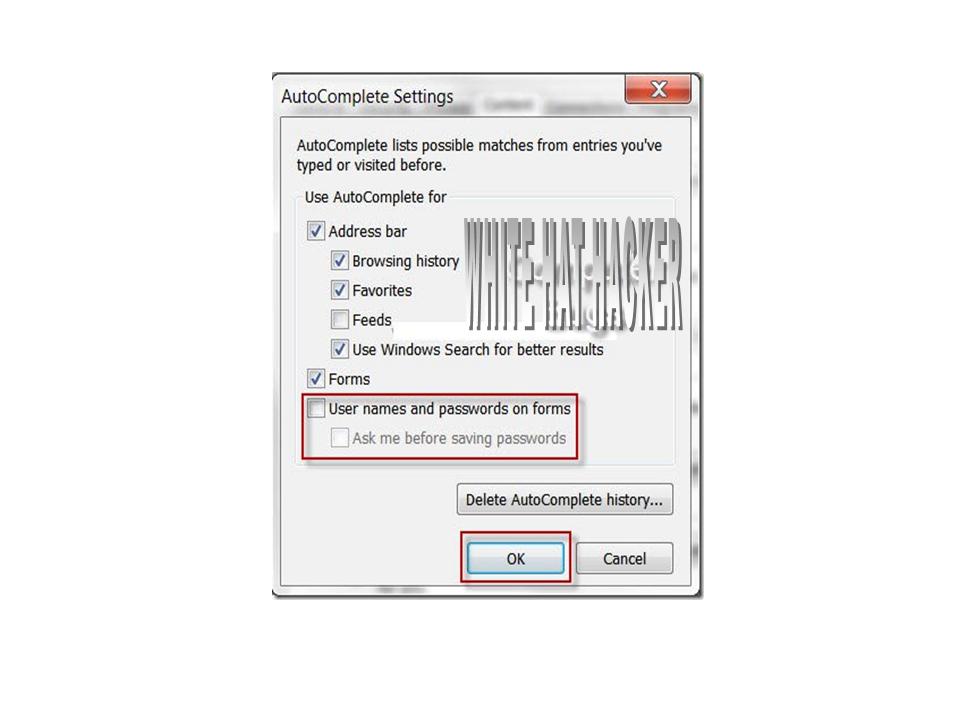
Now Click the Content tab on the Internet Options Window and click Settings Button under the AutoComplete Section.
Hope you find this tutorial useful. Leave your comments and suggestion below.

Easy File Protector 5.1 Software + Keygen


Easy File Protector 5.1 Software + Keygen || File Size: 1.70 MB. 

Easy File Protector is a very flexible password protected security utility that restricts access to your files and folders by user-defined time schedule. You choose users, define restricted files/folders and time periods for them, and activate the program. After that, your system disables/enables your files automatically depending on current time and user. Protection is achieved by making files and folders undeletable, unrenamable, unreadable, unmodifiable, and unexecutable. With the wild cards feature, you can protect all files that have the same extension (such as EXE, DLL, DOC, etc.) Easy File Protector also provides password protection, user-dependent configurations, and user validation at login.

Major Features:

* Protect files
* Protect folders
* Disable Internet access
* Password-protect any program
* Hide folders
* Protect files and programs by time
* Password-secured application

Installation :

1. Unpack
2. Install
3. Use Keygen
Download: Easy File Protector 5.1 Software + Keygen
           

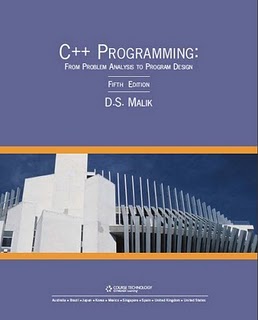
C++ Programming From Problem Analysis to Program Design 5th Edition


C++ Programming From Problem Analysis to Program Design 5th Edition || 
PDF || English || 1392 Pages || 5.11 MB. 
It  is the latest edition of the definitive text for CS1 courses. Author D.S. Malik continues to employ his student-focused, example-based methodology to teach C++ programming to introductory computing students. Each chapter includes new debugging sections, a wealth of new and updated exercises, and many helpful self-study tools such as complete programming examples. All syntax is explained thoroughly and reinforced through extensive examples and diagrams, and students are motivated to understand the "why?" behind key C++ concepts. 


How to unlock/unhide/show the administrator account in windows xp


In every installation of Windows XP there is a built-in and default administrator user account named Administrator, which is equivalent to super user or root in Unix system. However, if you have set up another user account in Windows XP, the Administrator account will be hidden, cloaked and invisible in User Accounts or Computer Management.

Now the Question is How to Unhide it ?
To see the Administrator account, you have to Boot Windows in Safe Mode. However, you can modify the Windows registry so that the Administrator account will be shown at Windows XP Welcome screen for you to select, in the Control Panel’s User Accounts and in the local user lists in Computer Management.


How to ?
1. Launch Registry Editor.
2. Navigate to HKEY_LOCAL_MACHINE\SOFTWARE\Microsoft\Windows NT\CurrentVersion\Winlogon\SpecialAccounts\UserList in the
Registry Editor.
3. Double-click the Administrator key in the right pane.
4. If the Administrator key doesn’t exist, right-click on the above
tree in the pane, choose New, DWORD Value, name it Administrator and press .
5. Type 1 in the Value data box, and press .
Note: To launch User Accounts in Control Panel, you can go to Control Panel -> User Accounts, or click Start -> Run, and then type Control userpasswords and press Enter.
Once you unhide and reveal the Administrator account, you can change its picture or assign it a password or change the password. In addition, on the next boot to the Welcome screen, the Administrator account will be visible, along with all of the computer’s other user accounts.

Adobe Photoshop Every Tool Explained


Adobe Photoshop Every Tool Explained || Eng
PDF || 130 Pages || File Size : 5 MB. 

Every Tool Explained. There are 130 pages which are full of stop spamming, projects and tips on how to use Photoshop easily and how to get the best out of one of the best Photo imaging programs out there.


Subjects covered in the book include Selection Tools in Photoshop:


Navigating and Editing Your Images
Using the Brushes and Pencil Tools
Using the Cloning and Healing Tools
The Gradient, Eraser and Fill Tools
Getting to Know the Effects Tools
Working with the Type Tool
Working with Paths, Vectors and Masks
Annotations, Notes and the Measure Tool
Creating Top Quality Artwork

                       DOWNLOAD

Remote Desktop Manager v6.1.7.0


Remote Desktop Manager v6.1.7.0 || File Size : 3.71 MB. 

Remote Desktop Manager is a small application used to manage all your remote connections and virtual machines. Add, edit, delete, shared, organize and find your remote connection quickly. Compatible with Microsoft Remote Desktop, Terminal Services, VNC, LogMeIn, Team Viewer, Ftp, SSH, Telnet, Dameware, X Window, VMware, virtual PC, PC Anywhere, Hyper-V, Citrix, Radmin, Microsoft Remote Assistance, Sun Virtual Box and more.

FEATURES:
Microsoft Remote Desktop (RDP)
Microsoft Remote Assistance
VNC (UltraVNC, TightVNC, RealVNC and embedded)
LogMeIn
Team Viewer
FTP (Explorer, Filezilla and WinSCP)
X Window
Putty (SSH, Telnet, RAW and rLogin)
Dameware Mini Remote Control
Radmin Viewer
Citrix XenApp (ICA)
Symantec PC Anywhere
Microsoft Hyper-V
Microsoft Virtual PC
Microsoft Virtual Server
Microsoft Windows Virtual PC
Sun VirtualBox
VMware Player, VMware Workstation, VMware ESXi and VMware vSphere
Cisco VPN client
SonicWall Global VPN client

Installation :
1) extract with winrar/winzip
2) run setup
3) use the serial to register
4) enjoy

TeamViewer Premium 5.1.9290 Incl Serial


TeamViewer Premium 5.1.9290 Incl Serial || File Size : 2.93 MB. 

TeamViewer establishes connections to any PC all around the world within just a few seconds. You can remote control your partner's PC as if you were sitting in right front of it. Find out why more than 4.000.000 users trust TeamViewer.
TeamViewer is a simple and fast solution for remote control, desktop sharing and file transfer that works behind any firewall and NAT proxy. To connect to another computer just run TeamViewer on both machines without the need of an installation procedure. With the first start automatic partner IDs are generated on both computers. Enter your partner's ID into TeamViewer and the connection is established immediately. With many thousand users worldwide TeamViewer is a standard tool to give support and assistance to people in remote locations.
The software can also be used for presentations, where you can show your own desktop to a partner. TeamViewer also is VNC compatible and offers secure, encrypted data transfer with maximum security. TeamViewer is completely free for private use.


FEATURES:
• One solution for everything. While most competitors offer different packages for remote support, remote administration, training and sales (and also charge for them...) TeamViewer is the one-stop solution for everything you need: TeamViewer includes all modules in one simple and very affordable package.
• Remote administration of unattended servers. TeamViewer can also be used to control unattended computers and servers. Installation as a system service even allows remote reboot and reconnect.
• File transfer. TeamViewer comes with integrated file transfer that allows you to copy files and folders from and to a remote partner - which also works behind firewalls
• Highest security standard. TeamViewer is a very secure solution. All versions feature completely secure data channels with key exchange and RC4 session encoding, the same security standard used by https/SSL.
• No installation required. To install TeamViewer no admin rights are required. Just run the software and off you go...
• High performance with international router network. Optimized for connections over LANs AND the Internet, TeamViewer features automatic bandwidth-based quality selection for optimized use on any connection.
TeamViewer uses an extended international server network with server locations in many countries all over the world, so no matter where you are located we will make sure that a high-security, high-performance router near your home destination will ensure great performance.
• Remote support without installation. With TeamViewer you can remotely control any PC anywhere on the Internet. No installation is required, just run the application on both sides and connect - even through tight firewalls.
• Remote presentation of products, solutions and services. The second TeamViewer mode allows you to present your desktop to a partner. Show your demos, products and presentations over the Internet within seconds - live from your screen.
• Works behind firewalls. The major difficulties in using remote control software are firewalls and blocked ports, as well as NAT routing for local IP addresses. If you use TeamViewer you don't have to worry about  firewalls: TeamViewer will find a route to your partner.
• Flexible use for a variety of applications. TeamViewer lets you connect to your partners in many different ways: You can either view or control your partner's desktop in order to do online-support; You can transmit your screen to your partners for presentation purposes - You may even change directions during a session for high fidelity teamwork!
Changes in TeamViewer 5.1:
New Features:
* Terminal Server support: TeamViewer can be configured to create an ID per user on server operating systems. With this new feature each Terminal Server user can be accessed remotely at the same time.
* Files can be transferred to the remote desktop by drag & drop on the remote control window
* Groups are matched also when searching in the partner list
* A new button in the remote toolbar simplifies switching between multiple remote monitors
* A new button is shown in the remote toolbar when the remote computer requests the input of the Ctrl+Alt+Del key combination
* The current computer is marked with "this computer" in the partner list
Further improvements:
* Unicode characters in e-mail templates are handled correctly
* Audio is transmitted to all presentation participants
* The Windows desktop gets locked correctly after a TeamViewer session
* All windows appear in the foreground if they were created through user interaction
* Several problems in file transfer were resolved


install use key to register.

Driver Updater Pro


Driver Updater Pro || File Size : 2.78 MB. 

Keep drivers up to date automatically with Driver Updater Pro. Recognizing more than a million hardware devices, Driver Updater Pro keeps your system always up to date, guaranteeing the best performance and reliability to your Windows XP or Vista PC completely automatically. The intelligent driver update engine detects outdated drivers, providing a comprehensive report and offering to update the drivers.Unleash full potential of your computer by keeping drivers up to date! Outdated drivers can slow down your PC and exhibit all sorts of compatibility problems. Updated versions of drivers provided by manufacturers fix many reliability and performance issues, solve all sorts of software and hardwarecompatibility problems, and introduce support for new standards and protocols. Do you know what you've been missing? New drivers often introduce more convenience and advanced features you've been wishing for. Don't wait and update your drivers with Driver Updater Pro! Driver Updater Pro saves youhours of hunting for the latest drivers. Download driver updates safely from within a single place. Driver Updater Pro only deals with the original equipment manufacturers, so you'll always get the latest version of genuine drivers for your hardware. No need to write down devices' model and serialnumbers, search the Internet or visit every OEM Web site in order to keep your system up to date! Driver Updater Pro incorporates the largest database of devicedrivers, allowing you to automatically download drivers for most modern and legacy devices. Even if you have an exotic piece of hardware,chances are that Driver Updater Pro has the right driver for it!

Driver Updater Pro 4.1.4.2 Maintenance software developed by iXi Tools. The license of this maintenance software is shareware, the price is $29.95, you can free download and get a free trial before you buy a registration or license. Do not use warez version, crack, serial numbers, registration codes, pirate key for this maintenance software Driver Updater Pro. If you want to get a full and unlimited version of Driver Updater Pro, you should buy from original publisher iXi Tools.

Driver Genius Professional Edition 10.0.0.526 Incl Serial


Driver Genius Professional Edition 10.0.0.526 || File Size : 6.38 MB.

Driver scan scheduler – schedule regular scans to ensure your drivers are always up-to-date
Download Verification – auto-checks downloaded drivers to ensure complete downloads
Driver download location can be set by user
Automatic removal of out of date drivers from download manager
Driver scan accuracy. Now provides more accurate information about out of date drivers
Thousands up updates and additions to the Driver Database
One-click driver installation. install multiple drivers with a single click
Driver downloads are faster and more reliable
User interface enhancements make Driver Genius easier and more convenient than ever

3D English Grammer Portable


3D English Grammer || Portable || Size : 9.25 MB ||


Do you know a verb from an adjective? This is a simple and very easy to use portable software to improve your English, the words are categorized making it super easy to use. No installation needed, just download and start learning
Installation:
1) Extract with winrar/winzip
2) Run the program
3) No need of any crack or patch its portable
4) Enjoy


DOWNLOAD

Oxford English Dictionary Software 11th edition portable


Oxford English Dictionary Software 11th edition portable || File Size : 7.12 MB. 
Dictionary software generally far exceeds the scope of the hand held dictionaries. Many publishers of traditional printed dictionaries such as Langenscheidt, Collins-Reverso, OED Oxford English Dictionary, Duden, American Heritage, and Hachette, offer their resources for use on desk top and lap top computers. These programs can either be downloaded or purchased on CD-ROM and installed. Other dictionary software is available from specialised electronic dictionary publishers such as iFinger, Abbyy Lingvo, Collins-Ultralingua, Mobile Systems and Paragon Software. Some electronic dictionaries provide an online discussion forum moderated by the software developers and lexicographers. 

INSTALLATION:

1--No need to install
2--Just Double click and enjoy learning in software

Flash Drive Recovery 1.3 Software + Serial Key


Flash Drive Recovery 1.3 Software + Serial Key || 1.45 MB. 


SoftOrbits Flash Drive Recovery is a flash data recovery tool. It can recover data from any type of storage media (music sticks, digital cameras, Flash drives, USB drives, PC cards, etc). This tool restores all corrupted and deleted photosdocuments, mp3 and other files even if a memory card was re-formatted.
You can see recovered photos and other documents with the free trial version. After the program is purchased, you can save all files to your hard-drive. There is 100% Success Rate. You do not need to set any options - the entire process is done automatically with a built-in photo recovery wizard.
SoftOrbits Flash Drive Recovery allows you to:
- Preview and recover JPEG, JPG, TIFF, BMP, PNG, GIF, TGA and other images.
Preview and recover RAW images (CRW, CR2, NEF, PEF, RAF, RAW and other formats).
- Recover files from various storage media including: Floppy disk, Digital camera, Zip Disk, Smart Media Card, Sony Memory Stick, Compact Flash card, MicroDrive, Secure Digital Cards, xD Picture Card, Flash Card, USB disks and many others.
- Works under Microsoft Windows 2000, XP, 2003 Server, Vista.

Installation :

1. Unpack
2. Install
3. Use Serial Key
4. Enjoy it

Password Recovery Bundle 2010 1.50 + Serial Key


Password Recovery Bundle 2010 1.50 + Serial Key || 
File Size: 1.23 MB. 

Password Recovery Bundle 2010 is a must-have toolkit in case your password is lost or forgotten, capable of recovering passwords for all popular instant messengers, email clients, web browsers, FTP clients and many other applications. Over 45 types of passwords can be cracked instantly. The program automatically finds and decrypts the passwords stored on your local computer, even novice users can use it to successfully recover lost passwords.

Key Features & Benefits:
* 100% recovery rate.
* Wide compatibility - Designed to recover passwords for a wide range of applications such as email clients, instant messengers, FTP clients, web browsers, etc.
* Unique abilities - Allow to recover passwords for more than 45 programs.
* Save you time and money - Find your lost passwords easily! No need to call in an expensive PC technician. Never worried about losing your important accounts again.
* Instant recovery - Passwords will be recovered in no time.
* Super easy-to-use interface.
* FREE technical support.
* FREE update.

Built-in Password Recovery Tools

* MSN Password Recovery — Recovers passwords for MSN Messenger, Windows Messenger, Hotmail, MSN Explorer and Windows Live Messenger accounts.
* Email Password Recovery — Retrieves passwords to mail accounts created in Outlook 98/2000/XP/2003/2007/2010, Outlook Express, Windows Mail, Windows Live Mail, Eudora, Incredimail, Becky! Internet Mail, Phoenix Mail, Ipswitch IMail Server, Reach-a-Mail, Mozilla Thunderbird, The Bat!, PocoMail, etc.
* PST File Password Recovery — Enables you to recover lost or forgotten passwords to personal folders in Microsoft Outlook (.pst files).
* Windows Cached Password Recovery — Recovers Windows 7/Vista/2008/2003/XP/2000/NT autologon password (when user is logged on).
* Dialup Password Recovery — Helps you to easily recover logins and passwords for RAS, VPN or Dial-up Networking connection.
Google Talk Password Recovery — Recovers login and passwords for your Google Talk, Google Desktop, Gmail Notifier, Picasa and Gmail accounts stored on the local computer.
* Miranda Password Recovery — Recovers AIM, ICQ, MSN, Yahoo! Messenger, Jabber, IRC passwords stored by Miranda instant messenger.
* Product Key Finder — Easily finds lost product key (CD Key) for Windows, Microsoft Office, SQL Server, Exchange Server and many other products, even if you can't boot into Windows.
* AIM Password Recovery — Recovers lost or forgotten passwords for AOL Instant Messenger, AIM Pro, AIM 6.x and 7.x.
* IE Password Recovery — Allows you to recover passwords to Web sites saved in Microsoft Internet Explorer, as well as AutoComplete passwords. Remove Content Advisor passwords.
* Firefox Password Recovery — Displays logins and passwords for protected sites stored by Firefox and Mozilla browsers, even from crashed computer.
* New! Opera Password Recovery — Recovers website passwords stored by Opera browser, as well as passwords to all mail accounts configured in Opera Mail.
* Chrome Password Recovery — Allows you to view the usernames and passwords stored by Google Chrome Web browser.
* Trillian Password Recovery — Finds all Trillian accounts saved on your local computer. All versions of Trillian are supported: Trillian Basic, Trillian Pro and Trillian Astra.
* Paltalk Password Recovery — Recovers AIM, ICQ, MSN, Yahoo! Messenger and ICQ passwords saved by Paltalk instant messenger.
* FTP Password Recovery — Decrypts FTP passwords stored by most popular FTP clients: CuteFTP, SmartFTP, FileZilla, FlashFXP, WS_FTP, CoreFTP, FTP Control, FTP Navigator, FTP Commander, FTP Voyager, WebDrive, 32bit FTP, SecureFX, AutoFTP, BulletProof FTP, Far Manager, etc.
* Access Password Recovery — Unlocks Microsoft Office Access 95/97/2000/XP database.
PDF Password Recovery — After purchasing a license of Password Recovery Bundle, you will receive a coupon code with 25% discount for Recover PDF Password from our partner!
* Other Password Recovery — Recovers passwords for Digsby, Pidgin, GAIM, Gizmo5, Ipswitch Instant Messaging, EasyWebCam, Camfrog Video Chat, VNC, Remote Desktop Connection, Total Commander (former Windows Commander).

Installation :
1. Unpack
2. Install
3. Use Serial Key
4. Apply & Run

WindMend Data Recovery 1.4.0.0 Software + Serial Key


WindMend Data Recovery 1.4.0.0 Software + Serial Key || File Size : 2.34 MB. 


WinMend Data Recovery is a Windows-based data recovery application. It recovers data on FAT12/ FAT16/FAT32/NTFS/NTFS5 partitions in Windows operating systems. It can be used to scan partitions in various hard drives, removable drives and even in data cards, and to search and recover deleted or missing files, files lost during formatting or due to partition exceptions. With unique recovery algorithm, WinMend Data Recovery can significantly improve the accuracy and speed of scanning, and ensure everything done in an absolutely safe condition without any negative impact on the system.

Features:

1. Quick Scan
With this safe and high-speed scan engine, you can quickly locate and recover most deleted files.
2. Full Scan
In case Quick Scan fails, you can go through Full Scan, which will never miss a single chance to find missing files. Full Scan may take longer. However, with our unique engine, its speed and reliability are still significantly higher than its peers. (Full Scan is strongly recommended for formatted partitions.)
3. Unformat a Drive
If you lost your files due to the formatting of a drive, you can recover them with our Unformat a Drive function. Unformat a Drive helps you easily look for the lost files on the formatted drives and get them back with a few simple clicks!
4. Safe File Recovery
WinMend Data Recovery always ensures safe operations while recovering files. It never overwrites any current files. For those files that are not deleted but inaccessible because they are locked by the operating system or other applications, WinMend Data Recovery recovers and saves them to other partitions. Keep in mind, all operations are safe, and your current files will not be damaged or overwritten.

Installation :

1. Unpack
2. Install
3. Use Serial Key